 EVERYTHING


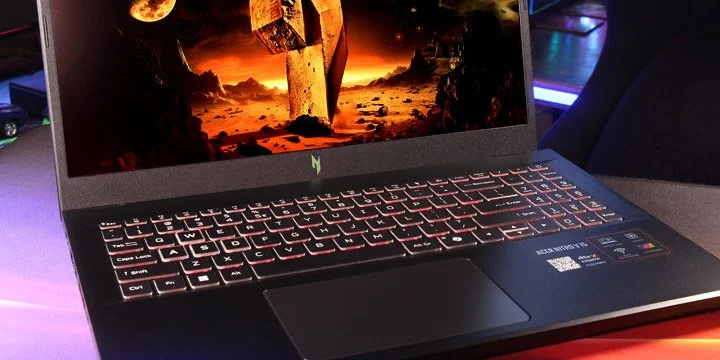
According to Overclockers, the new Nitro V 15 (model year 2026, codenamed Sportage2) represents a strategic move by Acer to provide accessible gaming hardware. While the brand's Predator line caters to high-end enthusiasts, the Nitro series focuses on delivering essential components without unnecessary premium markups. The ANV15-A31 configuration serves as an entry-level showcase for the latest architecture cycle.
Core Hardware and Performance Specs
The device is built around a balanced internal ecosystem designed for longevity. It utilizes the AMD Ryzen 5 150 processor, which is based on the proven Rembrandt Zen 3+ architecture. This CPU offers 6 cores and 12 threads with clock speeds reaching up to 4.55 GHz. Complementing the processing power is the NVIDIA GeForce RTX 5050 Laptop GPU, featuring 8GB of GDDR7 memory and support for DLSS 4 technology.
Key technical specifications include:
- Display: 15.6-inch Full HD IPS panel with a 165Hz refresh rate and AMD FreeSync.
- Memory: 16GB DDR5-4800 RAM, configured as two 8GB SO-DIMM modules for easy future upgrades.
- Storage: 512GB NVMe PCIe 4.0 SSD.
- Connectivity: Wi-Fi 6E, Bluetooth, and a Gigabit Killer Ethernet E2600 port.
Design and Ergonomic Engineering
Acer has opted for a restrained gaming aesthetic with the Nitro V 15. The chassis is constructed from black plastic featuring clean lines and a metal Nitro logo on the lid. While the finish is prone to fingerprints, its dimensions make it notably more mobile than larger 17-inch alternatives. Weighing just 2.1 kg, the laptop remains portable even when paired with its compact 135W power adapter.
One notable engineering detail is the unique hinge mechanism. Rather than a standard 180-degree opening, the design allows the bottom edge of the screen to act as a lever. This lifts the base of the laptop slightly off the surface, improving airflow for better cooling and providing a more ergonomic typing angle. The port layout is distributed across both sides, including USB4 Type-C, HDMI 2.1, and an RJ-45 jack.
The inclusion of Windows 11 Pro and a 76Wh battery suggests that Acer is targeting a professional demographic that requires a reliable machine for multi-purpose use cases. By combining Blackwell graphics with a versatile Ryzen chip, the Nitro V 15 provides a stable platform for users who prioritize value over extreme specifications.